At work you rarely control the desk, so the practical feng shui answer is a ladder: first choose or request the best seat you can (solid backing, view of the approach, no glare), then change what you do control (screen, chair, surface, one small object), and only then add symbolic extras. Tradition is the tie-breaker; ergonomics and your employer's rules come first.
Last checked: 13 November 2026
| Key fact | Figure or rule | Source |
|---|---|---|
| Eye-to-screen distance | 40 to 74 cm (about 16 to 29 in.); arm's length is a usual estimate | CCOHS, Positioning the Monitor |
| Monitor angle | About 15 degrees (or slightly lower) below the horizontal line of sight | CCOHS, Positioning the Monitor |
| Top of screen | Not higher than the operator's eye; slightly below for bifocal or progressive lens users | CCOHS, Positioning the Monitor |
| Seat height rule of thumb | About one-quarter of body height, with feet flat on the floor or a footrest | CCOHS, Chair guidance |
| Keyboard and mouse height | Just below seated elbow height | Government of Canada, Module 5 |
| Monitor and windows | Place the monitor at right angles to windows; use blinds or glare screens | Government of Canada, Module 5 |
| Open-plan noise and privacy | Noise disturbance and lack of speech privacy were each linked to lower satisfaction with the environment (334 employees, six offices) | Lee et al., Ergonomics, 2015 |
Almost every desk guide assumes you can turn the furniture around. In an office you usually cannot. The desk is bolted into a bench, the cubicle walls belong to facilities, and the seat plan was drawn by someone who never heard of the command position. This guide sorts the real situations you are likely to be in, says what tradition wants in each, and separates what you can change today from what needs a request.
What the tradition says, and where schools differ
The idea most people mean by "feng shui desk" is the command position. Form school practitioners describe it as sitting where you can see the door or the main approach without being directly in line with it, with something solid behind you. Our command position guide covers the three rules in full, and the home-office desk placement guide works through five layouts for a room you control.
Three schools or styles show up in office advice, and they do not always agree:
- Form school looks at the seat itself: backing, outlook, exposure, how many people walk behind you. It is the source of "back to the door is unsettled" and "a blank wall in front is cramped".
- Compass school and Eight Mansions assign a favorable facing direction by personal number. The Kua number guide explains that system. In an office the building decides which way you face, so most people treat Kua as a minor preference, if they use it at all.
- BTB (Black Sect) teaches the Bagua laid over a desk surface, with the edge nearest you as the "Career" side. This is the one method that works even when the desk cannot move, which is why it appears below.
Practitioners say these ideas describe how a seat feels and what it exposes you to. They are traditions and design heuristics. No school can promise a promotion, a raise or a better review, and this page does not either.
The honest ranking for a workplace is simple. If tradition and a health and safety rule disagree, the rule wins. If tradition and your manager's seating plan disagree, the plan wins unless you ask. If tradition and your own comfort disagree, trust the comfort and keep the symbolism light.
Step 1: identify your situation
Seven situations cover most workplace desks. Find yours, then read its section.
- Cubicle with your back to the aisle or opening.
- Open-plan bench or row desk.
- Desk facing a wall or partition.
- Desk facing another person.
- Hot desk you clear every night.
- Private office you can rearrange.
- Reception or counter desk.
The decision table later in this page puts all seven side by side. First, the detail.
Situation 1: cubicle with your back to the aisle
This is a common case ("feng shui desk back to door"), and the one tradition treats most seriously. The worry is straightforward: people can approach from behind and you cannot see them coming. Most workers recognize the feeling without any tradition at all, which is why so many people angle their chair or monitor to catch the corridor.
What tradition wants. Backing behind you and a view of the opening. In a cubicle, "solid" means a panel at chair-back height or taller, not an open walkway.
What you can change today, without asking:
- Turn the chair and screen position slightly, within the workstation, so you can see the opening with a glance. Only if the cables and reach allow it.
- Use a tall chair back. Practitioners often prefer a high back as a symbolic backing, and it also supports the spine.
- Keep a filing unit, bag or bookshelf behind the chair only if it does not block an exit or a walkway.
- Place a small mirror or a glossy, reflective object so that it shows the approach. See the mirror section below for the limits.
What needs a request: turning the desk, moving to a cubicle with its opening in a different place, or adding a partition panel. Ask facilities, framed as "I get startled by people coming up behind me when I am concentrating on the screen". That is true, easy to approve, and a normal comfort request.
Situation 2: the open-plan bench
A shared bench has no door to face, so the command position becomes a question of backing and outlook. The best seats tradition would pick are at the end of a row against a wall or a window-free partition, or with a column or storage unit behind. The worst are in the middle of a main route, where everyone passes at your back.
Here the evidence from outside feng shui is useful. In a study of six open-plan offices in China and Korea (334 employees), noise disturbance was linked to lower satisfaction with the environment, and weaker speech privacy was linked to lower satisfaction with both the environment and the job (Lee and colleagues, Ergonomics, 2015). Noise disturbance was also linked to more self-reported health symptoms but, in their model, not to job satisfaction. That is a survey in two countries, not proof for your office, and the authors note that speech privacy was measured with only two items. But it fits what many people feel: a seat that is sheltered from traffic and voices is easier to work in.
What you can change today: choose the quieter seat if your office lets you choose, sit with your back to the wall and face the room if you must pick, and keep a small barrier of your own (a stack of files, a low shelf, a shielded plant) only if the floor rules allow.
What needs a request: a seat move, a screen panel, or a return to a team seating plan that groups people with similar noise needs. Phrase it around concentration, not symbolism.
Situation 3: the desk facing a wall
Practitioners say a blank wall close in front of you feels cramped and limits outlook, and that a wall behind the monitor with nothing on it makes the space dull. It is the easiest situation to improve, because the wall is right there and the change is small.
What you can change today:
- Make sure the wall is not too close. Leave enough room that you can sit back without touching it, and check the screen distance against the ergonomic range in the table above.
- Give the eye somewhere to rest. One calm image with depth, such as a landscape or open path, is the usual traditional suggestion. Our wall art placement guide covers size, height and what to avoid. At work, check what the employer allows on a partition, and use pin boards, not adhesives that mark walls.
- Keep the surface clear. A short, tidy desk reads as calmer than one stacked with paper.
What needs a request: a seat with a side view or a window view. Ergonomics supports this too: a long view across a room gives the eyes a break from a near screen.
Advertisement
Situation 4: the desk facing another person
Two desks facing each other, with or without a low divider, are common in call centers, design studios and small firms. Tradition does not condemn the layout. It does say that direct, unbroken sight lines to one person all day can feel confrontational, and that both people are exposed to each other's screens and conversation.
What you can change today: a low shelf, a plant that is allowed, or even a tall mug and a tidy stack of folders can soften the line without a screen. Angle the monitor so it is not a barrier between you, and keep your personal items off the shared center.
What needs a request: a desktop screen panel. Ask for one with a reason that has nothing to do with feng shui: "I am on calls most of the day and so is the person across from me." Noise and privacy are the strongest case you can make, and the Lee study above is a reasonable, honest thing to cite.
Situation 5: the hot desk you clear every night
With no fixed seat, you cannot hang art or keep a plant. What you can do is pick the seat and run a reset each morning.
Choosing the seat: solid wall or tall partition behind, a view of the entrance, not in the main path, a monitor at right angles to any window. This is the whole command position in four points, and it costs nothing.
The 10-minute reset (below) is built for this case. Nothing stays overnight, so nothing needs approval, and the ergonomic adjustments take effect for the whole day.
What needs a request: a permanent seat. Some employers will give one for a clear reason, such as a health need or a part of the room that suits a task.
Situation 6: the private office you can rearrange
This is the one case where you can follow the tradition more fully. Everything in the home-office desk placement guide linked above applies, with two extras. Check the door swing before you place a desk, because an office door that opens into the back of the chair is a hazard no tradition would accept. And leave the walkway clear for an exit.
If the room is small, the door, window and video call layout guide shows how to balance the door sightline against window glare and a call background. The same trade-off applies at the office, where a video call from a private room with a bare wall behind you often looks better than one from the open floor.
If you also use the micro-Bagua method for the desk surface, the micro-Bagua hybrid guide explains how to combine it with a room-level map.
Situation 7: reception or counter desk
A reception desk faces the public by design. Tradition's advice is to see the door while something solid stands behind you; the counter is a natural front barrier. You can usually tidy the counter and add one steady object such as a small lamp. Request a back panel or a seat that does not face a bright glass door all day. The screen is often low and to the side here, so ask for the ergonomic fit early.
The small mirror at the desk: attributed, and with its limits
Many feng shui writers recommend a small mirror, or any reflective object, to let you see behind you when your back is to a door. The standard idea in the Form school is that seeing the approach removes the "exposed" feeling of a back to the door. Our existing mirror placement guide covers mirrors in depth. For work, keep these limits in mind.
- It is a tradition, not a fix. A mirror shows you a reflection. It does not change who walks in or what a manager thinks.
- Mind the screen. A mirror that catches a window or a lamp can put a bright spot on your monitor, which is exactly the glare the ergonomic sources tell you to avoid.
- Mind confidentiality. A mirror can also show your screen to people behind you. If you handle personal data, do not use one.
- Mind shared space. A large mirror, or one facing the aisle, can annoy colleagues. A small one is fine; a convex or concave one is a different object (see the flat, convex and concave guide).
- Ask if unsure. Some workplaces restrict items on partitions or screens. A small glossy item is easy to remove if someone objects.
The desk surface by the Bagua, as BTB teaches it (short version)
BTB practitioners lay a three-by-three grid on a desk surface, with the edge nearest you as the bottom row. The traditional labels run, near to far: Knowledge, Career and Helpful People on the near row; Family, Health and Creativity in the middle; Wealth, Fame and Relationships on the far row. Practitioners say you place items that suit those themes in each area.
At work, treat this as a tidy-desk framework, not a ritual:
| Area | Traditional theme | Plain, allowed way to use it |
|---|---|---|
| Near center | Career | Keep it clear and uncluttered where your hands work |
| Near left | Knowledge | Notebook and reference documents |
| Near right | Helpful People | Phone or contact list within reach |
| Far left | Wealth | A small plant or a lamp, if allowed |
| Far center | Fame | A small, work-appropriate award or certificate |
| Far right | Relationships | One photo or a team item, only if you want it |
Nothing here needs a request. On a hot desk, use the near-center rule alone: keep it clear.
Plants and employer rules
Tradition treats a healthy plant as a Wood element addition that softens a hard office. The lucky plants guide covers the common ones. At work, three things come first: whether your employer allows plants, whether the spot gets enough light for the plant, and whether you or a colleague has an allergy. A plant on a windowless bench that slowly dies is, by the tradition's own logic, worse than none.
Choose a small, stable, easy-care plant. Keep it off the keyboard side, and keep it below the screen's sight line. If the office provides plants, you do not need your own.
Advertisement
Personal items
Practitioners suggest few personal items, chosen because they are meaningful: one photo, one object. Many employers set rules on candles, heaters, incense, fairy lights and wall fixings, and fire rules are not negotiable. Leave those out. Keep a tidy edge, and avoid a collection of sharp or cluttered objects pointing at the chair, which tradition regards as distracting.
Screen and chair: where tradition meets ergonomics
This is the part that gives immediate results. Feng shui tradition prefers a stable, supported seat, and the ergonomic sources agree on the detail.
The monitor. Eye-to-screen distance is 40 to 74 cm, with arm's length a usual estimate, according to the Canadian Centre for Occupational Health and Safety (CCOHS). The same page recommends placing the monitor at about 15 degrees (or slightly lower) below the horizontal line of sight, and says the top of the screen should not be higher than the operator's eye. People with bifocal or progressive lenses may find a slightly lower top comfortable. The OSHA workstation eTool puts it in plain words: the top edge at eye height or just below. If you use two monitors, keep them at the same height.
The chair. CCOHS gives the rule of thumb that the best seat height is about one-quarter of body height, with feet on the floor or on a footrest and no pressure under the thighs. A backrest should adjust and give firm lumbar support, and armrests should allow you to sit close enough to the desk and keyboard. The Government of Canada's workstation module adds a gap of two to three fingers' width between the seat's front edge and the back of the knees, and thighs parallel to the floor or sloping slightly downward.
The keyboard and mouse. Just below seated elbow height, with wrists straight and in line with the forearms (Government of Canada, OSHA).
The window and glare. The Government of Canada module recommends placing the monitor at right angles to windows, with opaque vertical blinds or glare screens where needed. This is also the cleanest feng shui compromise: it keeps the view of the window to the side of your seat, rather than in front of or behind the screen.
Light and noise. Lighting standards differ by country and building, and this guide gives no lux figures because none could be verified from a primary source on the check date. Ask your facilities or health and safety contact what the workplace standard is, and see our lighting guide for the home-based version. For noise, the open-plan evidence above supports a quieter seat and a screen panel as legitimate requests.
OSHA's own page is a reminder of the limit of all this: "There is no single 'correct' posture or arrangement of components that will fit everyone." Use the figures as a starting point and adjust to your body.
Decision table: situation to fix
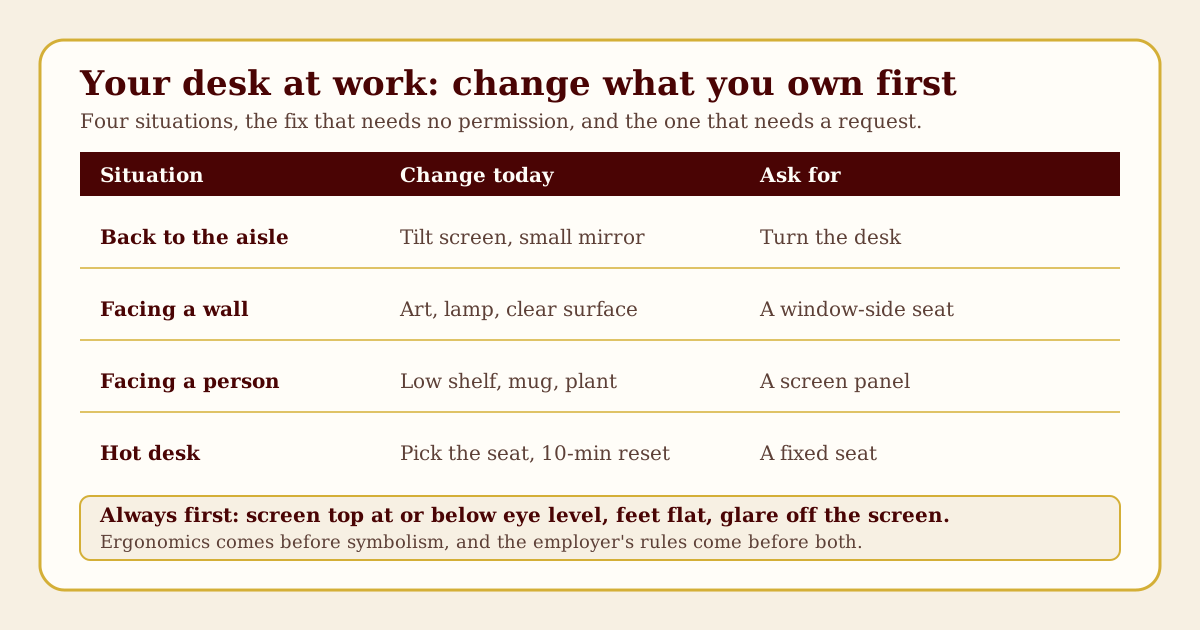
| Situation | What tradition wants | Change today (no request) | Request (in order) |
|---|---|---|---|
| Cubicle, back to aisle | See the opening; solid backing | Tall chair back, small mirror if allowed, tidy surface | Turn desk; different cubicle; panel behind |
| Open-plan bench | Backing, away from main route | Choose the quieter seat if free, keep screen angled | Seat move; screen panel |
| Facing a wall | Outlook, not cramped | One calm image on an allowed board, clear surface | Seat with a side or window view |
| Facing a person | Softened line of sight | Low shelf or allowed plant, angled monitor | Desktop screen panel |
| Hot desk | Solid wall behind, view of entrance | Pick the seat; 10-minute reset | A fixed seat |
| Private office | Full command position | Rearrange, check door swing and exits | Window treatment, lighting |
| Reception | See door and be seen; backing | Small shelf behind, tidy counter | Back panel; sit-stand desk |
What to ask your manager for, in order
Ask in this order. The early items are health and safety requests, and are easy to approve. The later ones are comfort requests that need a reason.
- A chair and monitor height that fit you. A fit check by the person responsible for ergonomics, or monitor risers or an arm.
- Glare control. Turn the monitor to right angles to the window, add blinds or a glare screen.
- A task lamp if overhead light is too dim or too harsh at your seat.
- A footrest if your feet do not reach the floor at the right chair height.
- A quieter seat or a screen panel if noise or conversation is the problem. Cite concentration.
- A turned desk or a different cubicle if your back is to the aisle and you are regularly startled.
- A fixed seat if you hot desk and your tasks need a stable setup.
- Anything decorative (art on a partition, a plant) last, and only if the rules are unclear.
Keep each request short, written, and tied to your work. You need not mention feng shui; "I work better with a wall behind me" is enough.
The 10-minute desk reset
For any desk, including a hot desk:
| Minutes | Do this |
|---|---|
| 0 to 2 | Clear the surface. Keep only what you need for the next hour. |
| 2 to 4 | Set the chair so your feet are flat and your thighs are parallel to the floor or slope slightly downward. Check there is a gap behind the knees. |
| 4 to 6 | Set the monitor at arm's length with the top at or below eye level. Turn it away from direct window reflections. |
| 6 to 7 | Set the keyboard and mouse just below elbow height, wrists straight. |
| 7 to 8 | Check the sightline: can you see the approach with a glance, without twisting? If not, adjust the chair angle a little. |
| 8 to 9 | Place one personal item, if you want one, at the edge of the desk, not in the center. |
| 9 to 10 | Wipe the screen and the surface. Check the light on the screen. |
Three worked desks
Desk A: the cubicle, back to the aisle. Inputs: a standard cubicle with the opening behind the chair, a window two cubicles away to the left, an office that bans adhesives on panels. Moves today: raise the monitor so the top is at or just below eye level, angle the chair slightly so the opening is visible with a glance, add a small desk mirror at the edge of the screen only if it catches no window light, and use a tall chair back. Request: a panel across the opening, framed as noise and being startled, then a corner cubicle if one opens. Result in tradition's terms: backing improved, view of the approach restored. In ergonomic terms: nothing worse than before.
Desk B: the open-plan bench facing a colleague. Inputs: a long shared bench, two people facing each other, no divider, a main walkway behind your chair, no window nearby. Moves today: tidy the center, set the monitor to the side so it is not a wall between you, put a low shelf of files at the shared edge. Request: a desktop screen panel for noise and speech privacy, then a seat at the end of the row. Result: a softer sightline and less exposure, with no cost or decoration.
Desk C: the hot desk. Inputs: a different seat each day, a shared floor, lockers for belongings, a bright window on the west side. Moves today: choose the seat with a partition behind and the window to the side, run the ten-minute reset, carry one small item in your bag. Request: a fixed seat on the quiet side of the floor if it suits your tasks. Result: the command position's four points in about ten minutes, and nothing left behind.
Advertisement
Edge cases and common mistakes
- Turning the desk without asking. Moving furniture in an office can break cable rules, block an exit or void a facilities plan. Ask first.
- Putting a mirror where it shows a screen. Good for tradition, bad for confidentiality.
- A plant that blocks sightlines. The point was to soften, not to hide you.
- Treating the Bagua as a rule. On a desk it is only a tidy-desk framework. Do not buy things to fill its areas.
- Ignoring glare for the sake of the door. A seat that faces the door with a bright window behind the screen is a worse seat than one that does not. Pick glare control first.
- Hoping a symbol fixes a noisy seat. If your seat is loud, the fix is a request or a different seat.
- Study at the same desk. If the desk doubles as a study desk, see our study desk guide.
Buying section: a private office
If you have a private office and a say in the furniture, a few practical points apply. No brands here, and no prices.
- Desk size and shape. Choose a surface deep enough to put the monitor at arm's length with room left for the keyboard and your forearms, and wide enough for the mouse and a notebook. A rectangular or gently curved desk is easier to place against a wall. Tradition tends to avoid sharp corners that point at the chair; a rounded front corner is the easy answer.
- Chair with a high back. Tradition prefers a high back as a symbol of backing. Check the practical points first: the seat height range should suit you (CCOHS rule of thumb is about one-quarter of body height), the backrest should adjust and give firm lumbar support, and the armrests should adjust or come off so you can sit close to the desk.
- Task lamp. A shielded, adjustable lamp that you can aim away from the screen, placed on the side opposite your writing hand. Check it does not create a reflection on the monitor.
- Before you pay. Sit in the chair, if you can, at the desk height you will use. Check the desk edge does not press on your forearms. Check the cable route and the outlets.
- Check the rules. Furniture and finishes may be subject to your lease or fire rules, and an accredited ergonomic assessment can beat any rule of thumb.
Where to go next
If you also work from home, the home-office desk placement guide takes the same ideas into a room where you can move everything, and compares five worked layouts.
Sources
- CCOHS, Office Ergonomics: Positioning the Monitor. Supports the viewing distance (40 to 74 cm), the angle (about 15 degrees below the horizontal), the top-of-screen rule and the bifocal note. Checked November 2026.
- CCOHS, Office Ergonomics: Chair. Supports the seat height rule of thumb (about one-quarter of body height) and the backrest and armrest guidance. Checked November 2026.
- Government of Canada, Module 5: Guide to address ergonomics-related hazards with a computer workstation. Supports keyboard and mouse height, the seat-edge gap, monitor placement at right angles to windows and glare screens. Checked November 2026.
- OSHA, Computer Workstations eTool. Supports the top-of-monitor rule, posture notes and the statement that no single posture fits everyone. Checked November 2026.
- Lee, P. J., Lee, B. K., Jeon, J. Y., Zhang, M. and Kang, J. (2015), Impact of noise on self-rated job satisfaction and health in open-plan offices, Ergonomics. Supports the open-plan noise and speech-privacy findings (six offices, 334 employees). Checked November 2026.
Tradition claims on this page (the command position, the small mirror, the Bagua desk surface) are attributed to the Form school and BTB practice in general terms. No guild or published-author page was opened for the desk-surface labels, so they are described in general terms, with no direct quotations from those schools.
Editorial note: Feng shui is presented here as a cultural and design tradition for educational purposes. It does not predict or guarantee outcomes such as promotion, pay or health. Nothing here replaces your employer's workplace rules, your health and safety officer, building and fire codes, or advice from a qualified ergonomic assessor. Ask before moving furniture or fixing anything to a wall or partition.