Short answer
A Micro-Bagua is a desk-scale version of a nine-area Bagua map. It can give a hybrid worker a simple way to sort visual cues, supplies, and intentions on a work surface. It cannot predict income, fix a career, diagnose stress, or make a cramped desk productive by itself. Start with the chair, screen, light, power, safe routes, and the task you need to do; then use traditional symbolism only where it makes the setup easier to understand and maintain.
The useful question is not “Which corner will bring wealth?” It is: what must be reachable, visible, quiet, and put away for this desk to support the next hour of work? A nine-area map can make that question more concrete without asking you to believe that an object changes your future.
What a Micro-Bagua map is - and what it is not
The Bagua is an eight-trigram framework used in several Chinese philosophical and Feng Shui traditions. Modern “three-door” or desk-scale versions often place a three-by-three grid over a room or a work surface. The rear edge of a desk is commonly treated as the far side of the map, with the front edge nearest the seated person. Different schools use different methods, so a desk map is not a survey result or a universal classical prescription.
For a small surface, the value is practical: a repeated visual system can reduce the number of loose decisions you make before starting. A tray for current tasks, a place to capture requests, a clear keyboard zone, and a defined closing routine are all easier to keep when every object has a job.
Use these boundaries:
- A desk map does not prove anything about personality, health, intelligence, relationships, talent, money, or the future.
- It does not replace a safe workstation, building rules, an accessibility plan, medical care, a study plan, or a conversation with a manager.
- It is optional. A bare, functional desk is not “bad Feng Shui.”
- If a symbolic object crowds the keyboard, blocks a vent, makes a cable unsafe, creates glare, or distracts you, remove it.
This framing leaves room for tradition without pretending that a planter, crystal, colour, or compass direction can do work that belongs to people, tools, and conditions.
Read the desk in three layers before using nine zones
Many Micro-Bagua guides start by assigning an item to every square. That can turn a small desk into a display shelf. Work from the layers below instead.
Layer 1: the workstation must work
Before adding a map, check the physical setup you will use today.
| Check | What a workable answer looks like | Why it comes before symbolism |
|---|---|---|
| Chair route | You can sit, stand, and leave without catching cords, bags, drawers, or another person | A stable desk ritual is useless if the route is unsafe or annoying |
| Screen | The main display is readable without persistent glare or a forced neck position | A lovely colour palette cannot compensate for a painful viewing angle |
| Keyboard and mouse | The frequent tools are close enough that shoulders can relax | The work surface has to fit the task, not an imagined grid |
| Light | You can read paper and screen without reflections or a harsh shadow | Light changes at different times of day; test the actual hours you work |
| Power and heat | Chargers, cables, outlets, and ventilation follow their instructions and stay clear of walking routes | Do not run cords under rugs or overload outlets to preserve a layout |
| Access | Doors, windows, heating, storage, mobility equipment, and a shared route still work | A desk position cannot outrank access or egress |
The Canadian Centre for Occupational Health and Safety has detailed guidance on monitor positioning, keyboards and input devices, and fitting an office chair. These are starting points, not a medical assessment. If pain, numbness, headaches, vision symptoms, or fatigue persist, seek the appropriate clinician, workplace support, school accessibility office, or ergonomics professional rather than trying to solve the issue with a desk cure.
Layer 2: name the work the desk must support
The map should change with the task. A programmer using two screens, a student writing by hand, a counsellor on confidential calls, a designer using a tablet, and a parent paying bills need different surface priorities.
Write one sentence before moving anything:
For the next ___ minutes, this desk must help me ___ without making ___ harder.
Examples:
- “For the next 45 minutes, this desk must help me outline a report without screen glare.”
- “For this call, the desk must keep confidential notes out of camera view without hiding the doorbell.”
- “For homework, the desk must leave room for a textbook and pencil case without blocking the bed-to-door route.”
This is a more useful intention than “activate success.” It identifies a visible condition you can test.
Layer 3: use the map as optional visual language
Once the desk works and the task is defined, traditional Bagua names can help you choose a modest visual cue. Think of each zone as a prompt, not a command. Keep the number of objects low enough that you can wipe the surface, find a pen, and set up again tomorrow.
Advertisement
The nine desk zones, translated into useful prompts
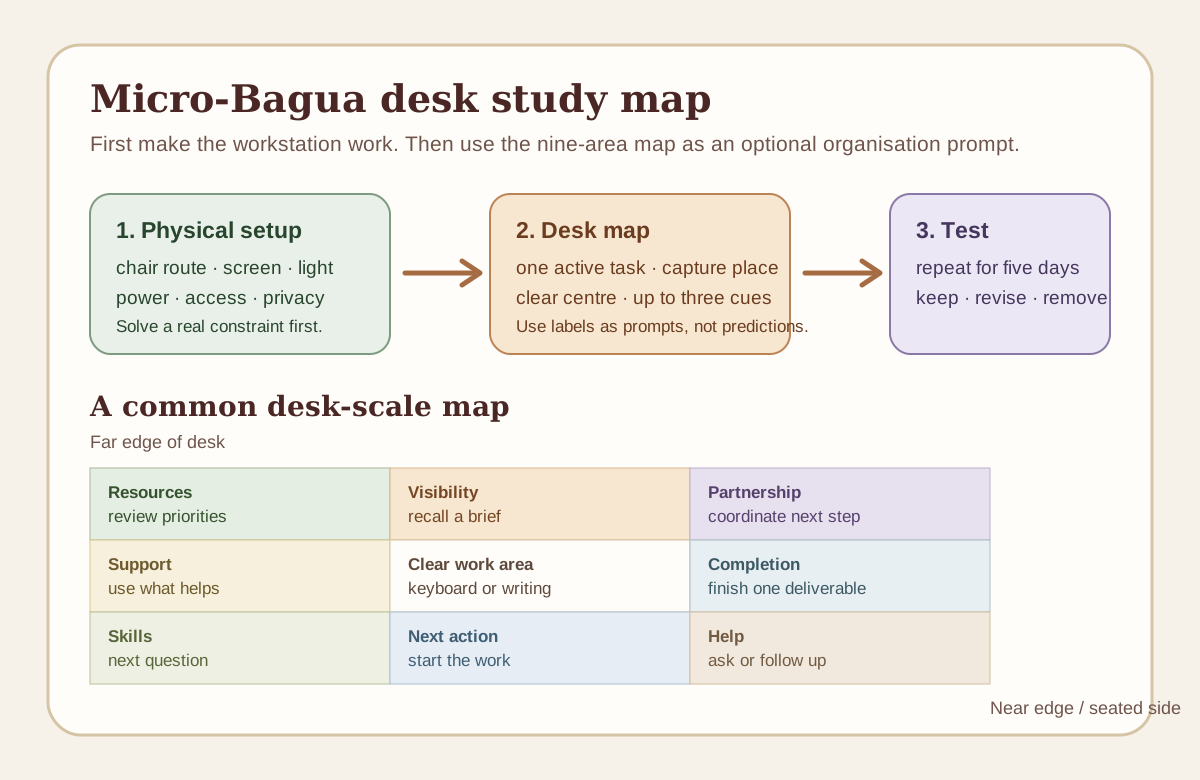
The following grid follows a common entrance-aligned desk convention: the far edge is at the top when you are seated, and the near edge is at the bottom. Some practitioners map these labels differently. Record your method and use it consistently rather than mixing charts from unrelated sources.
| Desk area | Common modern Bagua label | A grounded prompt | One optional, functional cue | Do not turn it into |
|---|---|---|---|---|
| Back-left | Wealth / abundance | What resource or priority needs regular review? | A budget notebook, invoice tray, or project list | A promise that money will arrive |
| Back-centre | Reputation / visibility | What should be easy to recall before a meeting or a difficult task? | A short brief, portfolio card, or one meaningful achievement | A demand to perform or appear impressive |
| Back-right | Relationships / partnership | Who or what coordination needs a clear next step? | A contact note, meeting agenda, or shared-task card | A verdict on a friendship, client, or partner |
| Centre-left | Family / ancestry | What existing support, routine, or tool already helps? | A reference book, family schedule, or durable pencil cup | An obligation to display personal history at work |
| Centre | Health / balance | Is the work surface clear enough to use safely and calmly? | Open space, a coaster, and only today’s active tools | A health test or a medical claim |
| Centre-right | Creativity / completion | What small deliverable would make this session feel finished? | Sketch pad, proofing checklist, or export folder reminder | A claim that décor makes someone creative |
| Front-left | Knowledge / skills | What is the next thing to learn or look up? | Course note, reference card, or question list | A guarantee of grades, insight, or expertise |
| Front-centre | Career / path | What is the next concrete action in the work itself? | Keyboard, daily plan, or task timer | A prediction about employment or promotion |
| Front-right | Helpful people / travel | Who could unblock the next step, and how will you ask? | Headphones, support contact, or prepared question | A promise that assistance will appear |
The centre deserves the least decoration. In practical terms it is often occupied by the keyboard, writing space, or a clear patch where work happens. Letting it remain clear is not a mystical rule; it makes the desk more usable.
A simple way to orient the grid
Place a sheet of paper on the desk with “front” written on the edge closest to you. Divide it into three rows and three columns. Before assigning objects, place the items you use every day: screen, keyboard, mouse, notebook, water, lamp controls, and a current-task tray. Then ask where a symbolic or organisational cue can fit without displacing a working tool.
If there is no spare space, the answer is not to buy a bigger symbol. The answer is that your desk is already doing its job.
Build a Micro-Bagua desk in ten minutes
Use this sequence for a desk, dining table, library station, shared studio, or a small corner of a bedroom. It is deliberately short. An elaborate reset can become another form of procrastination.
- Clear only what is unrelated to the next task. Keep the tools you will use in the next hour. Put the rest into one temporary bin or folder; do not start reorganising the entire home.
- Test the route. Roll or move the chair back, open the nearest door or drawer, and stand up carrying the bag you usually carry.
- Set the screen and paper. Check for glare now, not after you have started. Move the screen or adjust the covering before moving ornaments.
- Choose one active task. Put the first document, book, or project file in the most accessible position.
- Create one capture place. Use a small note, inbox tray, or digital list for new requests. This keeps every interruption from becoming a new pile.
- Leave the centre usable. Give the keyboard or writing area enough room to work without balancing on the desk edge.
- Add no more than three cues. A reference card, warm lamp, plant that suits the light, photograph, colour, or material can be enough.
- Check camera and privacy if you call people. Look through the camera preview. Remove confidential paper, distracting movement, and anything that reveals more of the home than you intend.
- Set a start and finish signal. A timer, a specific lamp setting, a playlist without alerts, or closing the notebook can mark the boundary between work and home.
- Take a photo or make a sketch. The goal is a repeatable setup, not a once-perfect one. A reference image makes the next reset faster.
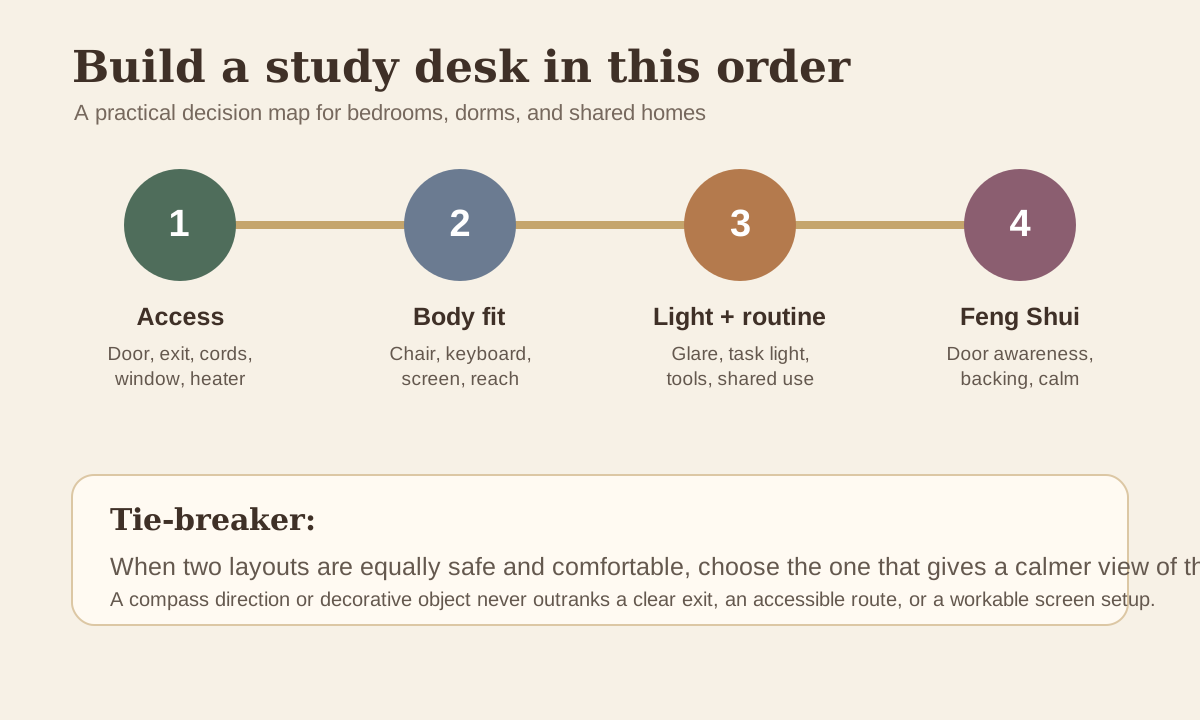
The International Feng Shui Guild’s workplace discussion describes command position as a traditional preference for seeing the entrance and having support behind the seat. Use it as a tie-breaker between equally workable layouts. It should not force a desk into the middle of a small room, block a door, or create screen glare.
Four real Micro-Bagua desk situations
1. A 60-centimetre desk in a bedroom
This desk holds a laptop, a notebook, and a lamp. The bed is behind the chair and the closet door opens beside it. A large desk grid is not realistic.
Start with the chair route and closet. A wall-facing desk may be the best choice because it keeps the room open and outlets nearby. Put a single task card just above the laptop (front-centre prompt), keep a small note on the left for questions to research (knowledge prompt), and use a lidded box or drawer for end-of-day storage. Do not add a fountain, a mirror, or a row of objects that makes the room harder to sleep in.
For detailed small-room alternatives, use the student study-desk guide. It compares wall-facing, door-aware, shared, and dining-table layouts without claiming any position controls grades or exam results.
2. A shared dining table
The table must become a family meal space every evening. Permanent zones will fail.
Use a portable kit: laptop stand if needed, keyboard, charger, headphones, notebook, and a tray. The tray is the desk boundary, not a magical object. At the end of the session, put all work items into it and restore the table. A removable blue notebook, metal clip, or wood pen holder can express an element if you enjoy the symbolism; it should earn its place by being useful.
If people move behind you often, agree on a “call in progress” signal or use headphones where appropriate. A predictable household routine will do more for concentration than trying to create a solid wall where one cannot exist.
3. A two-person home office
Do not optimise for symmetrical décor before testing sound, screen reflections, chair collisions, and different work styles. One person may need an expansive drawing surface while the other needs two monitors and confidential calls.
Give each person an individual current-task zone and a shared place for cables, stationery, and paperwork. A back-right relationship prompt can become a literal five-minute coordination card: “Who needs the quiet period? Who takes the call? What is the shared task?” That is a respectful use of the traditional label. It does not measure compatibility.
The home-office desk placement guide compares five layouts - including narrow rooms and two-person offices - using access, glare, cable, and chair-route checks before traditional preference.
4. A laptop on the couch
The couch may be the only available location, but it is usually poor for long sessions because screen, keyboard, and body positions are difficult to adjust together. A stable lap desk, external keyboard and mouse, or a short session with deliberate breaks may be more practical than a Bagua overlay.
Make one portable boundary: a small tray or bag that holds only the work tools. Before a call, check the camera preview and the nearest power lead. Afterward, close the work kit so the couch can return to rest. Do not use a candle, loose charging setup, or water vessel where spills, heat, fabric, pets, or children create a risk.
Five Elements without a shopping list
Five Elements language can help a desk feel less visually one-note. It does not require a themed product for every element. Use what is already present and keep it secondary to the workstation.
| Element | Traditional visual associations | A low-clutter desk use | Practical check |
|---|---|---|---|
| Wood | Upright growth, green, wood grain | Pencil cup, wood tray, or one plant suited to the light | Do not add a plant that you cannot water or that blocks daylight |
| Fire | Warm light, red, visibility | Adjustable task lamp or one warm accent | Avoid glare, hot bulbs, candles during work, and cables near heat |
| Earth | Ceramic, stone, warm neutrals | Coaster, stable tray, or a calm neutral surface | Heavy objects should not crowd a small desk or become a drop hazard |
| Metal | White, grey, circular forms, metal tools | Clip, lamp arm, or hardware already in use | Do not let reflective surfaces create screen glare |
| Water | Dark blue, black, flowing imagery | Notebook, mousepad, or quiet artwork | A real water feature can spill, need cleaning, and is not necessary |
The Five Elements balancing guide explains the cultural associations and shows how to choose colours and materials after a room’s light, temperature, and real use are clear.
A five-day desk experiment
Do not replace the chair, repaint the wall, buy organisers, and rearrange the whole room on the same afternoon. You will not know which change actually improved the workday. Run a small experiment instead.
| Day | Change | What to record |
|---|---|---|
| 1 | Observe the current desk without changing it | glare, awkward reaches, interruptions, piles, and route conflicts |
| 2 | Fix one physical problem | whether the chair, screen, light, or cable change is genuinely usable |
| 3 | Add one organisational cue | whether it makes the next task easier to start |
| 4 | Test the same setup during a normal call, study block, or difficult task | distractions, privacy, body comfort, and reset time |
| 5 | Keep, revise, or remove the change | whether the benefit is real enough to repeat |
Use plain notes rather than a “luck score”: “sun on screen at 3 p.m.,” “could not open drawer,” “found project brief immediately,” or “plant needed moving to water the desk.” These observations are more useful than forcing a result from a symbolic chart.
Micro-Bagua questions
Does a Micro-Bagua desk map work if my desk faces a wall?
Yes, if you want to use it. A wall-facing desk can be the best small-room arrangement. The map is a way to organise a surface, not a requirement that the desk face a particular direction. Give yourself a predictable way to notice someone entering, protect the screen from glare, and keep the route clear.
Which desk corner is the wealth corner?
In one common entrance-aligned desk map, the back-left corner carries a wealth or abundance label. It is a traditional or modern symbolic convention, not a financial tool. A budget notebook, invoice tray, or project-priority card belongs there only if it helps you review a real decision.
What should go in the centre of a Micro-Bagua desk?
Keep it usable. In practice the centre is often writing space, a keyboard, or clear surface. The common health label is not evidence about health. It is a useful reminder not to turn the desk into a pile of objects.
Can I use a Micro-Bagua map in an office or classroom?
Yes, as a private organisational prompt if it does not interfere with shared rules, safety, privacy, or another person’s workspace. In a shared setting, labels should never be used to judge a colleague, student, customer, or worker.
Do I need crystals, a fountain, or a mirror?
No. Use an item only if it is safe, permitted, simple to maintain, and helps you work. Crystals, fountains, and mirrors do not predict employment, wealth, health, or relationship outcomes. A mirror can also create distraction or glare; a water feature introduces maintenance and spill risk.
Sources and what to read next
- Canadian Centre for Occupational Health and Safety: monitor positioning - screen position, glare, and individual adjustment.
- Canadian Centre for Occupational Health and Safety: keyboard and input devices - reach, shoulders, wrists, and task fit.
- Canadian Centre for Occupational Health and Safety: office chairs - chair fit and workstation adjustment.
- International Feng Shui Guild: Feng Shui and ergonomics in the workplace and home office - a practitioner explanation of command position alongside workspace design.
What to read next: If the desk itself is hard to place, work through the five home-office desk layouts before adding a map. If the desk is part of a small bedroom, use the student study-desk guide to protect sleep, access, and study time first.